
Adidas – NSB Guide

by thesneakerscroll@gmail.com


NSB Guides

NSB supports more than 30 Adidas regions with different modes and options that you can use when creating an Adidas task!
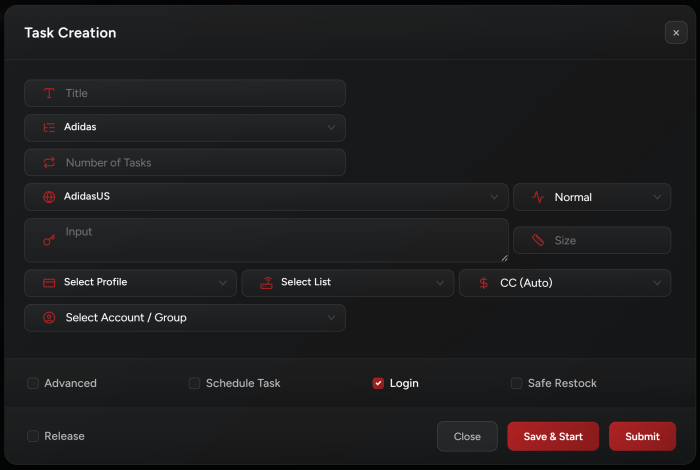


Task Creation

  1. Select your Adidas region from the site drop list.


  2. Enter the item PID:

    PID refers to the item ID on the Adidas site, we usually provide it before important releases. For example: https://www.adidas.com/us/ultraboost-shoes/G54001.html

    For this item, the PID is G54001


  3. Select your Size:

    Adidas supports multiple sizing. If you want to create a task with multiple sizes, just enter your sizes separated by -> or by commas (e.g. 6->8 or 6,6.5,7,7.5,8).


  4. Select your Billing and Proxy profiles.


  5. Release checkbox:

    This checkbox should only be checked if you are running on Yeezys. Otherwise keep it unchecked.


Release Tips

  • NSB will generate cookies on its own so you are no longer required to do that. Generating cookies is required as fallback mode.

  • Normal captcha solvers will be used for Adidas tasks: Log in to your BEST Gmail account on your Captcha solvers and then open your solvers.

  • Click Advanced to enter timeouts (keep them at default unless we provide other instructions).

  • Click Schedule Task to automatically start/stop your task at a scheduled time.

  • You cannot run multiple PIDs per task. One per task only.

  • You can also use FA (First Available), LA (Last Available) or RA (Random).

  • For US addresses, enter state as two letters abbreviation only & all CAPITALS.


Post Views: 3


You may also like

Leave a Comment