
Proxies – NSB Guide

by thesneakerscroll@gmail.com


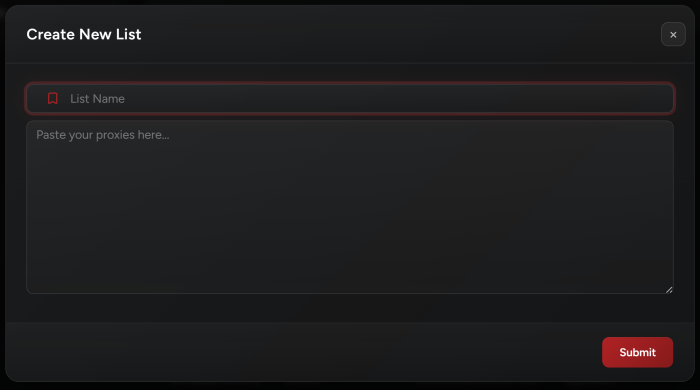
Move your mouse over to the Proxies tab on the left-hand menu to open it, then go to the top left and add a proxy list from the “+” button.
 

  1. First, you will need to name your proxy list.

  2. Second, you’ll have to add your proxies, they need to be in this exact format:

    IP:PORT:USERNAME:PASSWORD or IP:PORT

  3. Once you’re done just press Submit and you’re good to go.

  4. Latency Check: Choose the latency button on the top right to test your proxies on a specific site. Select a site from the dropdown and click Submit to test your proxies (it will show the status of your proxies and the ping time to this site).


Introduction to Proxies

In computer networks, a proxy is a middleman you’ve assigned to send and receive messages for you.

A proxy, generally, is someone or something that acts as an intermediary between two other people or things.

In computing, a proxy server is a computer that relays data between two others. The client computer connects to the proxy server in much the same way that it would connect to a web server or a game server or something like that. The client can then instruct the proxy server to connect to another server, such as a web server or a game server, on its behalf. It then relays data between the two.

Here’s a simple analogy. Suppose you want to discuss something with Frank but, for whatever reason, you can’t or don’t want to talk to Frank directly. You can instead go to another person, Jim, and say “Please give Frank this message”. Jim goes to Frank and gives him the message, then returns to you and tells you what Frank said in reply. In this scenario, Jim is the proxy, acting as a proxy server.


Import / Export Proxies

Say you’re moving your bot to a server and don’t want the hassle to insert your proxies again, well, we got you covered! Simply export your proxies and when you’re on a new PC/Server import them back.

Note: You can’t import proxies from other bots.


Post Views: 8


You may also like

Leave a Comment