
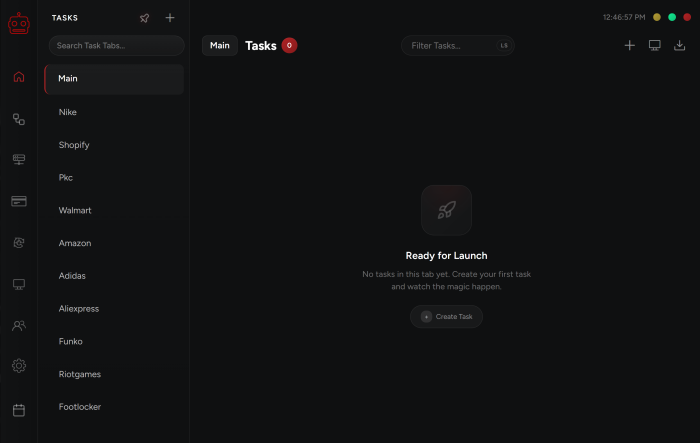
Navigate through the different tabs on the menu on the left side.
The tab you are in will be highlighted with a slick neon light indicating you currently have that tab opened. From here you can access all the tabs you want.
Tasks
This is where you can create a task from any of our supported sites to cop your desired sneaker.
Automation
Automation is a powerful feature designed to help you catch restocks across various sites and platforms.
Proxies
Here you can add your proxy lists which help you in running more tasks in order to avoid getting your IP banned.
Billings
This is where you manage your shipping address, your billing address, and credit card details.
Captchas
For security purposes, the checkout process for many sites is going to require solving captchas. This tab lets you create Captcha profiles that are linked to your Google accounts. That way AI Captcha solver can solve Captchas faster and easier.
Monitors
Monitors is a unique and powerful feature which allows you to monitor products that are loaded onto a wide range of websites and cop items using those discord monitors. Here you can create and manage your own discord monitors.
Accounts
Here you can create groups for your different site accounts, such as Nike, Adidas, Walmart, Undefeated, and more.
Settings
Here you are able to manage your settings, make sure you are on the latest version of the bot, view your bot’s expiry date, enter your: webhooks, Nike browser limit, monitor filter, APIs, and deactivate your bot.
Calendar
Here you can stay up-to-date with the upcoming releases directly from your bot.
Copped
In this tab you will be able to see all the items you successfully copped.
Post Views: 5
