

20
NSB Guides
Steps:
- Login to your account on Amazon and click settings in top right corner. You will get this:

- Let’s setup account authenticator and create account phrase. Click on “Access and security settings” (number 1 in picture above), you will get the following screen:

- Click Manage. You will get redirected to “Authenticator screen” as follows:

-
-
-
-
-

- Done preparing Authentication, now go back to account settings. Click “Addresses” (2 in picture below):
- You will get the following screen, make sure to add an address (step 1 in the picture below):
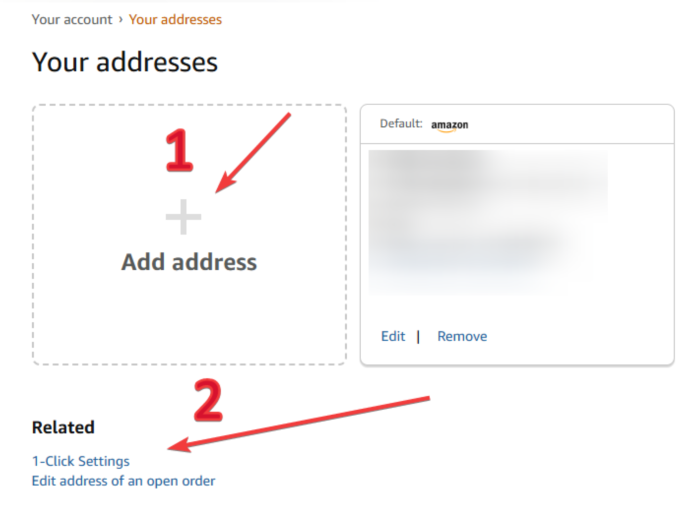
- Then click on “1- Click Settings” (step 2 in picture above). The following window will open, toggle the button in top right corner (as shown in picture below).
Note: If you didn’t get this toggle button, you can ignore this step.
- Done adding address, now go back to account settings and click “My Payments” (3 in picture below):
- Once you reach “Wallet” screen, make sure to add your payment by click on “Add a payment method”:

- After finishing all these steps, you can now use your Amazon account to checkout items smoothly in NSB!
Post Views: 3
