
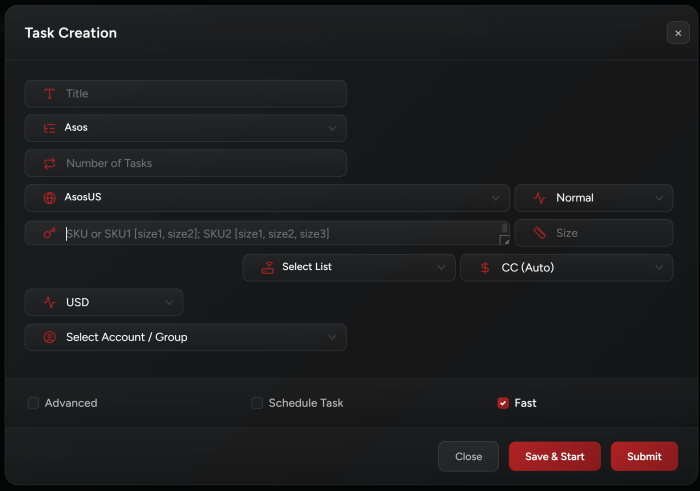
NSB supports the following regions for Asos:
AsosUS, AsosUK, AsosFR, AsosDE, AsosAT, AsosDK, AsosBE, AsosFI, AsosBG, AsosCZ, AsosES, AsosGR, AsosSE, AsosSK, AsosSW, AsosSI, AsosRO, AsosNO, AsosNL, AsosLU, AsosPL, AsosPT, AsosIT, AsosIE, AsosHU.
Task Creation
-
Accounts Tab:
• You need accounts to run Asos.
• Make sure to create an Asos account group in Accounts tab to add your Asos accounts.
• We support account generation (exactly same as AdidasConfirmed).
• It’s always recommended to prepare accounts and keep them ready in case Asos dropped a sudden restock. Don’t wait till a release/restock to generate/prepare accounts.
-
Select your Size:
When entering item sizes, you have to specify the first size as available on site. For example, if the item is showing:
MW US 6.5 - Womens US 8 - UK 6, you have to enter 6.5 in the size field. -
Currency:
You can select a currency for each task depending on which Asos region you are running.
This option can be used to save some money when checking out (for example, when checking out on AsosUK, an item might cost
100 GBPwhich is equivalent to116 EURbut at the same time, it costs100 EUR. So, in this case, you can select Euro to save about 16 euros). Some regions support only one currency. -
Fast Checkbox:
By default, when creating your tasks, this checkbox is enabled. Fast mode enables the task to checkout the item faster but usually works only with residential proxies. You may keep it enabled also with ISPs or DCs and see how it performs.
Asos Modes
1. Normal Mode:
Use this mode if you are going for an initial drop or if you want each task to monitor an item restock on its own (each task will keep checking if the item you want got restocked).
Monitor and Watch Modes:
These two modes are closely related and work together:
-
Running
Monitortasks without correspondingWatchtasks is ineffective. -
Watchtasks require activeMonitortasks; otherwise, they will show no Monitor task available for the given variant.
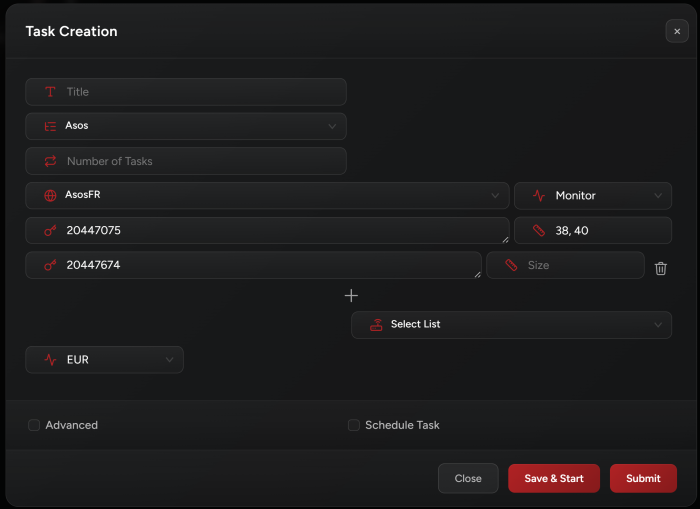
2. Monitor Mode:
-
Purpose: Continuously checks the availability of specified SKU(s).
-
Restock Detection: When a restock is detected, the Monitor task tries to select a size based on the user input. If found, it notifies all associated
Watchtasks, allowing them to:-
Add the item to the cart and proceed with checkout.
-
Send a manual checkout webhook to Discord (if you picked Manual checkout as payment option).
-
-
Proxy Use: A proxy list with high-quality proxies is recommended for running Monitor tasks.
-
Multiple SKUs:
-
You can add
Multi SKUsusing the+button. -
The task monitors all SKUs at once, depending on the number of proxies in the assigned proxy list.
-
The number of proxies should match or exceed the number of SKUs being monitored.
-
Watchtasks will be waiting for monitor tasks. Once notified,Watchtasks will start working instantly.
-
-
Number of Monitors Tasks:
-
You can create more than 1
Monitortask per variant (e.g. 3 Monitor tasks to monitor a single variant).
-
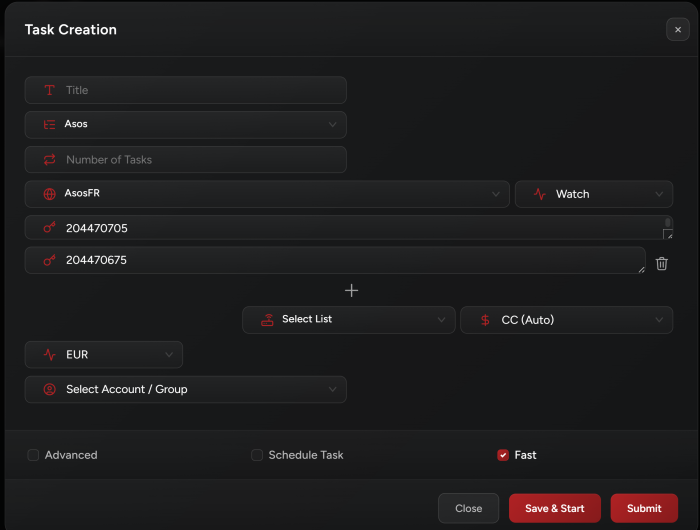
3. Watch Mode:
-
Purpose: Waits for a matching
Monitortask to detect a restock of a specific SKU and size. -
Triggering:
-
Once a restock is detected, the
Watchtask proceeds to manual or auto-checkout. -
You can add multiple SKUs to a
Watchtask (same as the Monitor task above). -
The task triggers as long as there’s a matching size available for restock.
-
-
Persistence:
-
Watch tasks run continuously until manually stopped.
-
After checkout, the task automatically restarts to maximize the chances of securing multiple restock checkouts.
-
-
Auto-Restart:
-
If the task fails to checkout within 2 minutes, it auto-restarts to attempt checkout again.
-
Release Tips
-
The Task and Account both don’t require captcha.
-
Supports manual checkout. If enabled, once the task adds the item to cart, it will stop and then you can manually complete the checkout using the same account.
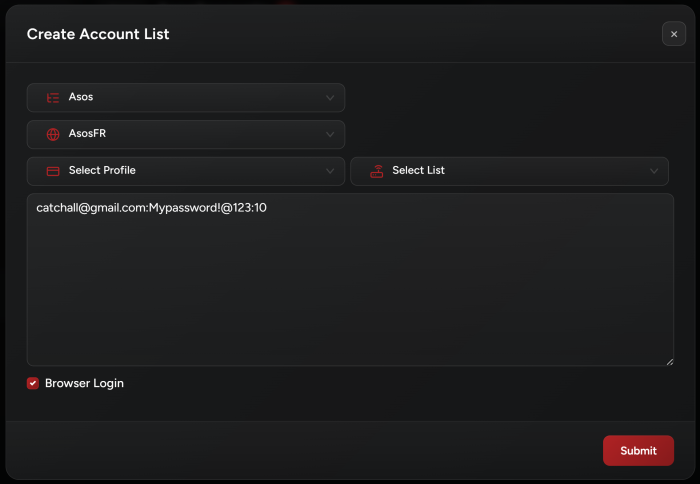
Account Generation
We support catchall format for account generation (supported on AdidasConfirmed and Asos). If you want to generate an X number of accounts, you can use the following format:
[email protected]:accountspassword:X
It is also recommended to generate your accounts using this format, where NSB will generate a random password for each account. This helps in avoiding account block/detection:
[email protected]:random:X
It’s recommended to enable Browser Login for smoother account generation and login.
Post Views: 6
